Showing posts with label Technology. Show all posts

Thursday, October 20, 2011

Moment of 80's Nostalgia Zen


Or why we "dial" the phone, what "high speed dubbing" is used for, blowing on game cartridges, the scream of a modem connecting, watching TV shows at a certain time and (working) pay phones..


And we didn't get Gopher, WAIS and Lynx until sophomore year of college!

For the exhaustive list, 100 Things our Children May Never Know About from GeekDad...

Credit for Sharon from Texas for inspiring this post.

Saturday, October 15, 2011

My Blackberry Is Not Working!


Like a tech version of Abbott and Costello's "Who's on First?" - check out this brilliant skit from "The One Ronnie" on BBC:

How to Free Up Space in iCloud


I found that after my first sync after upgrading my iPad to IOS 5, I was already running out of space in my iCloud account.  Of course, the option to buy more space was immediately offered, but after doing a little digging, I was able to drastically reduce the amount of space I was using for backup.  Here's how:

1.  Go to Settings, then choose iCloud, then Storage


2.  Select Backup/Manage Storage


3.  Select the device you want to edit


4.  Deselect any Apps which you don't need to backup - especially those that don't include any data, those with data you have backed up in other places (like my photos) and apps that you can easily re-download from the App Store if you need to.


That's it - I was able to cut my iCloud usage by about half by eliminating just a few apps.  Now I need to figure out how to use the space I freed up!


Here's an Apple Support article with more details:  http://support.apple.com/kb/HT4847

Wednesday, October 12, 2011

Solution for IOS 5 Download Problems - Error -3200, -3259, -3002


As Apple servers are overwhelmed right now by users trying to download IOS 5, many users are reporting "Error -3200" or "Error -3259" for iPads.  The error is just an indication that your download is timing out because of all of the demand.  If you want to bypass this problem and get IOS 5 as soon as possible, here's what to do:

MAKE SURE TO BACKUP YOUR DEVICE BEFORE UPGRADING.

1.  Download the IOS 5 Firmware directly from Apple by clicking on the links below, save the file to your desktop:

iOS 5 IPSW Firmware Update Files


2.  After downloading the desired firmware, you can shift-click (PC) or option-click (Mac) the "Update" button in iTunes. A file dialog will open and let you choose the downloaded ipsw-file from your desktop.

3. Proceed with the upgrade as usual.

4. If you get Error -3002 at this point, try to do a Restore, rather than an Upgrade - remember to shift-click (or option-click on a Mac).


Please let me know if you have any issues with this procedure in the comments section below.

UPDATE - Similar solutions for iOS 5.1: http://obscureport.blogspot.com/2012/03/solution-to-ios-51-download-problems.html

Wednesday, August 3, 2011

Podcasts 101 - How to Subcribe and Listen to Podcasts in iTunes


I listen to podcasts on a daily basis and they have pretty much replaced talk radio for me. The ability to listen to shows on specific topics that you are interested in is amazing.  There are podcasts on finance, technology, sports teams, TV shows, movies, sciences, humor - just about anything you can think of. Most of them are free, as well!

I find that when I mention in conversation that I heard something on a podcast, I get a blank stare most of the time.  Simply put, podcasts are audio and in some cases video shows which are posted with an RSS subcription feed, so that you automatically get the new episodes as they become available.

Podcasts have yet to completely hit the mainstream, even though programs such as iTunes make it easy to find, subscribe to and listen to them.  There are audio-only podcasts, as well as video podcasts.  I prefer audio for use in the car, where its probably better not to have the distraction of video.  Here's a quick guide to get started:

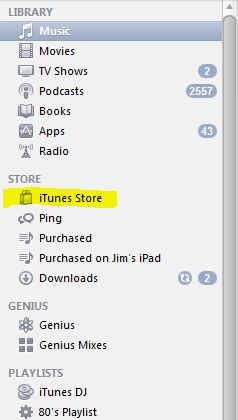
1. Open iTunes and click on "iTunes Store" in the left navigation panel:

Tuesday, July 26, 2011

Plex Media Server - Review


Plex Media Center is a set of server and client applications that allow you to organize and play your media from a Mac or PC (with Linux Server Support on the way).  On the client side, there are options not just for Macs and PC's, but for Apple IOS and Android Mobile devices as well.  Plex even includes support for devices such as LG Smart TV's and Roku Streaming Media Players.  With an active development community, Plex is constantly adding features, updates and support for additional services.

While there are many other applications which provide similar functionality, such as Boxee, Plex has a very slick interface and great support across a variety of platforms.  Plex began as a development fork of the Xbox Media Center, and is now supported by a corporation behind the development which includes a freeware/open-source development community as well as some sections which are proprietary and closed-sourced.

Plex provides a great "10 foot experience" when viewed on a television.  The interface for movies, TV and music includes information gathered from the Internet to provide a detailed summary and graphics to identify your selection.

Bose Companion 3 Series II Speakers - Review


Bose speakers have an excellent reputation for sound quality and range, and this set is an excellent way to bring that sound to your computer, portable device or home media center.  The Companion 3 set includes a sub-woofer, known as the "Acoustimass Module", two compact full-range speakers and a "Multi-Function Control Pod".
Setup is a snap connect the remote and speakers to the Acoustimass Module, and a standard mini-jack cable to your computer or other audio source, plug in the power and you are ready to go.  The sound is incredible, with deep bass and clear mid and high-range - it really fills the room.  There is no comparison to standard computer speakers - these are definitely Bose.

Saturday, May 28, 2011

Bitcoin - Anonymous, Peer-to-Peer Virtual Cash


There have been many attempts to establish a popular virtual currency system over the years.  Bitcoin is a recent one which seems to be gathering a lot of steam.  While digital currency and electronic payments are common, a replacement for real-world cash-like transactions has remained elusive and no standard has really caught on. 

Bitcoin meets many of the requirements of "e-cash" - it is secure, anonymous and completely decentralized and traded through a peer-to-peer network.  It is easy to use and allows private transactions between individuals.  Bitcoin is also most governments' worst nightmare - it is possible to conduct payments without any external trackable record - there is nothng to tax!

Bitcoin was developed by Satoshi Nakamoto in 2009, the realization of a paper he wrote, Bitcoin: A Peer-to-Peer Electronic Cash System.  It is also the name of an open-source client application which allows the exchange, storage and generation of Bitcoins, and is available for Windows, Mac and Linux platforms.

Saturday, April 23, 2011

TrueCrypt - Free, Simple, and Powerful Encryption for Everyone


Just last week, there was a minor furor when Dropbox amended their terms of service to announce that any data stored on the cloud service could be revealed upon government request.  This is really no different from the existing policies and actions of many cloud providers, from Google to Amazon to Yahoo.  Add to that the constant pressure of hackers and occasional accidental reveal of account information and passwords, and it is surprising that we have entered an era where many users are trusting their data to be stored on servers beyond their immediate control.  Considering this environment, encryption can be a useful tool in safeguarding that data, and TrueCrypt puts the power of top-quality encryption into a very user-friendly format, for free.
TrueCrypt allows several different types of encryption - you can encrypt an entire volume, such as a USB Storage Thumb Drive, or an entire Hard Drive.  You can also encrypt a system drive, preventing unautorized users from even booting into the Operating System.  You can encrypt a volume within a normal drive, allowing you to create a secure "locker" for sensitive files. 

Friday, April 15, 2011

Sometimes "Low Tech" Is The Better Solution


For years, I have illustrated the fact that the simplest solution is often the best one with the story of how NASA spent millions of dollars to develop the "Space Pen", which would write in zero gravity.  Meanwhile, the frugal but wily Russian cosmonauts used a pencil.


Today I learned that this is an urban legend, and that the Space Pen was developed independently from NASA by a an pen manufacturer, Paul C. Fisher, in 1965. NASA did buy the pens when Fisher presented them, and while Russia did use pencils in early space missions, they ordered 100 Space Pens in 1969 and used them for all future missions. It seems that the flammable nature of wooden pencils and the loose lead of broken mechanical pencil points were considered risks which were solved by the Space Pen.

Left without my prime example of why "high tech" isn't always the best solution, I was lucky enough to come across a new testament to this fact:

Wednesday, April 13, 2011

Is Amazon's Cloud Music Play Too Little, Too Late? What will Apple do?


Amazon's announcement of it's Cloud Drive and Player makes it first out of the gate of several "cloud locker" music services from some major players.  Goole and Apple are expected to bring out their own versions soon.  These services allow you to stream music that you already own from the Internet to an array of devices - computers, iPods and portable devices, phones, and other Internet-connected devices.  As pointed out on the highly recommended blog, BootsyBangingThrees.com, applications like Subsonic have allowed you to stream your music over the Internet for years, with a much higher degree of customization and privacy.  The question is - does the average user even want to do this?

Sunday, April 10, 2011

Tweetdeck - Desktop Twitter Client Review


Tweetdeck has long been one of the most popular Twitter clients on the iPhone and iPad - new client apps for these two devices are being re-written from the ground up and coming soon, according to the web site.  It has variants available for Android and Chrome, and is currently beta-testing a web-based client.  On top of all of these versions, one of the most-requested releases is now a reality - Tweetdeck for Desktops.

Tweetdeck's greatest strength is its ability to organize tweets and other social messages into groups and display them as columns, bringing some structure to the stream-of-consciousness that is Twitter.  These columns can be based on groups of people you follow, searches, or filters.  With the added screen real estate of a desktop, Tweetdeck becomes that much more powerful.  Beyond just centralizing and organizing your Twitter feed (or feeds if you have multiple accounts), it also allows you to integrate Facebook status messages, FourSquare Check-ins, LinkedIn, Google Buzz and more.

Thursday, April 7, 2011

Liza Moon Virus and MySQL Injection Attack - Security News


A SQL injection attack named "Liza Moon" after the first known web site to be compromised, has been spreading since December 2010, but appears to be accelerating and has to date affected millions of users.

There are two parts to this virus. First, the injection attack targets web sites running unpatched MySQL server instances, and once compromised, re-directs users to another web site that announces that the user's PC is infected and offers the download of "Windows Stability Center" to address this - a file which actually contains a trojan and is the second phase of the attack. The Windows Stability Center interface is very professional and the way that it presents threats makes it easy to understand how people are being duped into entering their information.

Monday, April 4, 2011

Mint.com - Web Service Review


Mint.com has been around for a few years, but I often find friends who are not aware of it, and as a fan, I like to spread the word.  Mint is a web-based service which allows you to collect and track all of your personal financial data in one place.  For me it has been a life-saver and allowed me to really get a picture of where my money is spent, and how to plan savings.
When you first log into Mint, you enter your various online accounts, along with passwords.  Mint has every bank account, credit card, loan, mortgage and investment that I use, and from the listings, I imagine they will cover just about everyone.  Mint securely contacts each of your accounts and aggreates the data, creating charts and reports of your combined finances.  It also has features which allow you to set budgets and goals.  Budgets are useful to track your spending during a given month on certain categories of spending, while goals allow you to set longer-term targets for savings, such as retirement. 

Thursday, March 31, 2011

iPhone 5 Fall Release? The Evidence is Adding Up and Wall Street is Listening


The rumors have been growing over the last few days that the iPhone 5 will not be released this summer, in the regular Apple update cycle, but instead will not be available until this the fourth quarter of this year (or September at the earliest). The initial reports came from those familiar with Apple's World Wide Developer's Conference (WWDC). While the 3GS and iPhone 4 made their public debuts at the last two WWDC events, Apple has made it clear that there will be no hardware announcements at this year's show, and the focus would be on software - IOS and the next version of the Mac OS, "Lion", which is set to ship this summer. With this disappointing news, the conference proceeded to sell out the same day that registration opened.

Wednesday, March 30, 2011

The Antikythera Mechanism - A Working Lego Model!


The Antikythera Mechanism is an ancient calculating machine discovered in a sunken wreck off the island of Antikythera in 1900. It appears to be of Greek origin, constucted between 150 and 100 BC. It is possibly from Corinth, and could be related to the work of Archimedes. It took years after its discovery for reseachers to piece together its function and recognize its complexity. An assembly of meshing gears, it is a complex scientific calculator known as an astrolabe. The user could input a date and the Antikythera Mechanism would calculate the position of the Sun, Moon, and even the planets. It was based on a 365 day calendar, and even dropped a day every four years, one hundred years before the Julian calendar added the concept of leap year.

Friday, March 25, 2011

Clamcase - iPad Case and Keyboard Hands-on Review


After a ridiculously long two month wait, I finally received my ClamCase Bluetooth iPad keyboard and case.

After living with it for a couple of days, I have decided I like it, but there were some negatives to get used to.

Thursday, March 24, 2011

Internet Explorer 9 - So Far, So Good


Although I have spent some time using Firefox, have been very impressed with Chrome, and use Safari every day on my iPad and MacBook, Internet Explorer has been my browser of choice since Netscape was bought by AOL. One of the major factors is that Microsoft Dynamics CRM, an IE-only web-based customer relationship management database, is my major line-of-business application. The fact that IE is pre-installed on most machines that I come in contact with also contributes to my use of it as a primary browser - chalk it up to the path of least resistance. I have endured the huge security holes and constant patching of IE6, and been somewhat content with the performance-lacking IE8. As soon as I had the chance to test the IE9 Technology Preview, I jumped right in.

Monday, March 14, 2011

Hacking Times Square Video Screens? What do you think?


The Momentum blog has posted a video showing the use of a device which supposedly allows the user to transmit video any video screen. I have several doubts about the validity of this - check it out:


First off, the device appears to be plugged into the iPhone's headphone port. This port does not have the capability to transmit video, so unless he completely rebuilt his iPhone, that part seems doubtful.

Second, the "repeater" is very small and does not appear to have an antenna or battery large than that of a watch. Without significant power and a way to direct the transmission, it seems highly suspect that this device can take over the video signal of "any screen", especially one of the largest and most likely best shielded screens in the world.

Third, in the first two demonstrations, the syncing is off - the first, the screen on the bus stand, has the video on the screen slightly ahead of the video on the iPhone - the second, the video on the screen lags slightly behind the phone. Lagging slightly behind is believeable, but how could the transmitted video be AHEAD of the the player transmitting it?

It's a really cool video either way, but I am just not buying it. Any thoughts?

Update 3/17/2011 - Sure enough, it was a "viral marketing campaign" for the movie "Limitless": http://www.businessinsider.com/iphone-times-square-video-screens-movie-ad-2011-3

Thursday, March 10, 2011

Android Remote-Destructs Malware - A Good Thing, as Long as Google Isn't Evil


Over the weekend, Google announced through a blog post that they had used a remote "kill switch" to not only deactivate, but remove, about twenty applications which exploited a security flaw to transmit the phone's carrier and user ID, and also allow downloading of further malicious code. Google followed up with a security update to close this issue, and made it clear that it was never a problem on Android versions 2.22 and higher.

Good for Google, right? Yes, good for Google, and good for its Android users - THIS time. Google is using a remote-removal feature which gives them an extreme amount of power over users, and it is again depending on our acceptance of its "Don't be evil" credo.


While Apple is roundly (and correctly) criticized for its draconian App Store approval process, one benefit is, it doesn't allow apps like this onto its phones. Google's Android App Store is much more open, and obviously these apps took advantage. That Google was able to reach out and pull back these apps was a benefit to users. It was also a clear sign of the power that Google has, and if that power were to be used less scrupulously, it could have far-reaching consequences, from non-competitive to down-right anti-privacy practices.

In the short term, Google has aided customers by helping them avoid malware. In the long term, we are left with deeper questions. As Google conglomerates the worlds' information, and information is clearly convertible to power, and power so famously corrupts, how much power is it going to take to corrupt Google? Is it just a matter of time? What will be the implications when it happens?